ECAL Geo-specific Content
In this Article:
Localise your event content by inserting the most relevant information and links for users in the specific location where the event is held. For example: fans subscribing to their team’s matches can receive localised broadcast information and a call-to-action to purchase tickets — with an accompanying quick link — tailored to their country.
Pre-requisites
- Create an ECAL Account and Schedule
- Log into your ECAL Account and follow the prompts in the ‘Getting Started Guide’ to create a schedule
- Register your Webhook endpoint to capture the User’s subscription details (e.g. email & ecal_id) as they subscribe
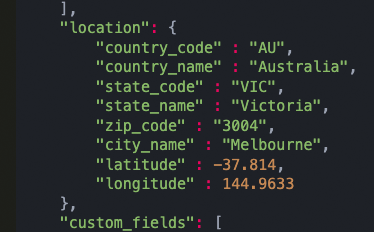
- Once registered, capture the geo location of the user, by looking at the notification payload. Use this data to filter/categorise user.
- Configure Button Display
- The Button Display must be configured so that it does not show any Schedules
- The Button Display must be configured so that it does not show any Schedules
- Once created, ensure your button is set to ‘Live’
- Publish your ECAL ‘Sync to Calendar’ Button following the instructions here
- Use ECAL’s Private Event API to publish geo-specific events to your subscribers’ calendars
Please note: Publisher is choosing the subscribers to add in content or event (not pre-determined content to global schedules)
Geo-specific Content - Sample Templates
Set up your own localised events by following the templates below.
1. Localised Sporting Event
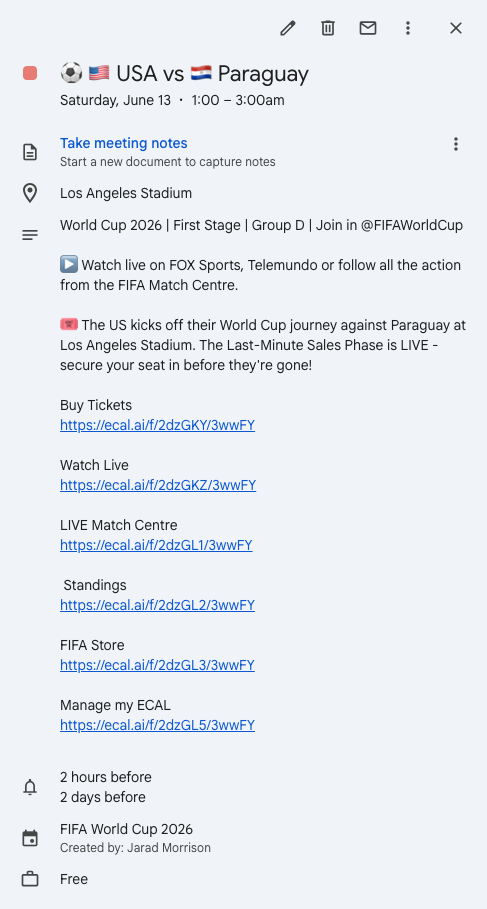
Set up your own ‘Localised Sporting Event’ by following the template below:
| API Field | Description | Type | Required | Example | |
|---|---|---|---|---|---|
| type | Event Type | string | YES | Private | |
| name | Title | string | YES | ⚽️ 🇺🇸 USA vs 🇵🇾 Paraguay | ⚡Tip: It’s a great idea to insert an emoji at the start of the title, to make the event standout in calendar! |
| location | Location/Venue of your Event | string | YES | Los Angeles Stadium | |
| startDate | The start date of the event. Must be in YYYY-MM-DD format | date | YES | 2026/06/13 | |
| startTime | The start time of the event. Must be in HH:MM 24hr format. Required unless ‘allDay’ field is set to ‘yes’. | time | CONDITIONAL | 01:00 | |
| endDate | The end date of the event. Must be in YYYY-MM-DD format | date | YES | 2026/06/13 | |
| endTime | The end time of the event. Must be in HH:MM 24hr format. Required unless ‘allDay’ field is set to ‘yes’. | time | CONDITIONAL | 03:00 | |
| allDay | If start/end times are provided, ‘allday’ is ’no’. | string | NO | no | |
| timezone | Timezone of your Event. | string/enum | NO | America/Los_Angeles | ⚡️ Tip: Local event time is a good way to go, or use a standard time zone throughout (e.g.: GMT). |
| alert1 | The initial reminder alert for the event before its due. | string/enum | NO | 2H | ⚡️ Tip: Set the reminders at the appropriate booking or decision window for your particular event! |
| alert2 | The secondary reminder alert for the event before its due. | string/enum | NO | 2D | |
| details | Description / comments about the event | string | NO | World Cup 2026 | First Stage | Group D | Join in @FIFAWorldCup ▶️ Watch live on FOX Sports, Telemundo or follow all the action from the FIFA Match Centre. 🎟️ The US kicks off their World Cup journey against Paraguay at Los Angeles Stadium. The Last-Minute Sales Phase is LIVE - secure your seat before they’re gone! |
⚡️ Tip: Provide as much relevant local information you can about this event, to inform your audience. E.g.: include an event description, TV broadcast information and a strong ‘call to action’, buy tickets etc. |
| sponsored_message | Additional messaging (120 char. limit) e.g.: Sponsor mention, special offer, offer code etc. | string | NO | ||
| quickLink[1] [name] | The name of quicklink 1 | string | NO | Buy Tickets | ⚡️ Tip: Quick Links will appear within the event details section of your calendar event. They are an amazing way to drive engagement and sales around your event! |
| quickLink[1] [url] | The url of quicklink 1 | string | NO | <insert link> | |
| quickLink[2] [name] | The name of quicklink 2 | string | NO | Watch Live | |
| quickLink[2] [url] | The url of quicklink 2 | string | NO | <insert link> | |
| quickLink[3] [name] | The name of quicklink 3 | string | NO | LIVE Match Centre | |
| quickLink[3] [url] | The url of quicklink 3 | string | NO | <insert link> | |
| Social Links | array | NO | <insert link> | ⚡️ Tip: Add links to your popular social pages, communities and apps, incl. Facebook, Twitter, Instagram etc. | |
| Social Links | array | NO | <insert link> | ||
| Social Links | array | NO | <insert link> | ||
| reference | Unique reference of the event, provided by you | string | YES | ||
| draft | Set this to 0 to push the event live. Defaults to 1 | bit | NO |
2. Localised Ticket Alert
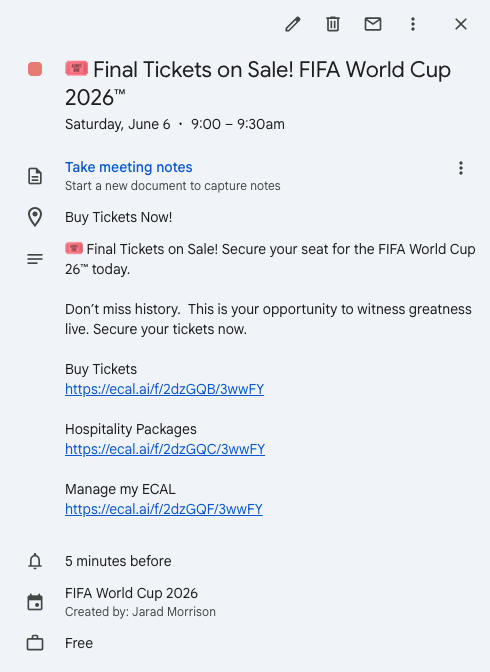
Set up your own ‘Localised Ticket Alert’ by following the template below:
| API Field | Description | Type | Required | Example | |
|---|---|---|---|---|---|
| type | Event Type | string | YES | Private | |
| name | Title | string | YES | 🎟️ Final Tickets on Sale! FIFA World Cup 2026™ | ⚡️ Tip: It’s a great idea to insert an emoji at the start of the title, to make the event standout in calendar! |
| location | Location/Venue of your Event | string | YES | Buy Tickets Now! | |
| startDate | The start date of the event. Must be in YYYY-MM-DD format | date | YES | 2026/06/07 | |
| startTime | The start time of the event. Must be in HH:MM 24hr format. Required unless ‘allDay’ field is set to ‘yes’. | time | CONDITIONAL | 09:00 | ⚡️ Tip: Set Ticket Alerts for 14, 7 or 5 days prior to the event date. |
| endDate | The end date of the event. Must be in YYYY-MM-DD format | date | YES | 2026/06/07 | |
| endTime | The end time of the event. Must be in HH:MM 24hr format. Required unless ‘allDay’ field is set to ‘yes’. | time | CONDITIONAL | 09:30 | |
| allDay | If start/end times are provided, ‘allday’ is ’no’. | string | NO | no | |
| timezone | Timezone of your Event | string/enum | NO | America/Los_Angeles | ⚡️ Tip: Local event time is a good way to go, or use a standard time zone throughout (e.g.: GMT). |
| alert1 | The initial reminder alert for the event before its due. | string/enum | NO | 5M | ⚡️ Tip: Set the reminders at the appropriate booking or decision window for your particular event! |
| alert2 | The secondary reminder alert for the event before its due. | string/enum | NO | ||
| details | Description / comments about the event | string | NO | 🎟️ Final Tickets on Sale! Secure your seat for the FIFA World Cup 26™ today. Don’t miss history. This is your opportunity to witness greatness live. Secure your tickets now. |
⚡️ Tip: Provide as much relevant information you can about this event, to inform your audience. E.g.: include an event description, a strong ‘call to action’, booking details, ticket pricing, ticket status, TV broadcast information etc. |
| sponsored_message | Additional messaging (120 char. limit) e.g.: Sponsor mention, special offer, offer code etc. | string | NO | ||
| quickLink[1] [name] | The name of quicklink 1 | string | NO | Buy Tickets | ⚡️ Tip: Quick Links will appear within the event details section of your calendar event. They are an amazing way to drive engagement and sales around your event! |
| quickLink[1] [url] | The url of quicklink 1 | string | NO | <insert link> | |
| quickLink[2] [name] | The name of quicklink 2 | string | NO | Hospitality Packages | ⚡️ Tip: Limit the number of quick links to drive action. Ensure they are relevant. |
| quickLink[2] [url] | The url of quicklink 2 | string | NO | <insert link> | |
| quickLink[3] [name] | The name of quicklink 3 | string | NO | ||
| quickLink[3] [url] | The url of quicklink 3 | string | NO | ||
| Social Links | array | NO | |||
| Social Links | array | NO | |||
| Social Links | array | NO | |||
| reference | Unique reference of the event, provided by you | string | YES | ||
| draft | Set this to 0 to push the event live. Defaults to 1 | bit | NO |